Understanding AutoFeed's Credit System
AutoFeed.ai uses a credit-based system to generate videos. Think of credits as currency - each video you create costs a certain number of credits. The more advanced features you use, the more credits you'll need.
Step 1: What Are Credits?
Credits are the units used to generate videos on AutoFeed. Every video type has a different cost:
- Faceless videos (AI Slideshow, Reddit Stories, Would You Rather, Pick One, Fake Text): from 1,000 credits a video; longer slideshows and animated images cost more
- UGC Ads: from 1,000 credits a video
- AI Videos: priced per clip by model, length and resolution (see each model's price)
- YouTube Clips: 1,000 credits a job, plus 100 per minute of source video and 500 per clip
Step 2: How Credits Are Replenished
On a monthly plan you receive your plan's credits at the start of each billing cycle (Hobby 15,000, Pro 60,000, Ultimate 180,000). On an annual plan the whole year's credits arrive up front. A new account also gets free credits once, enough for its first faceless video.
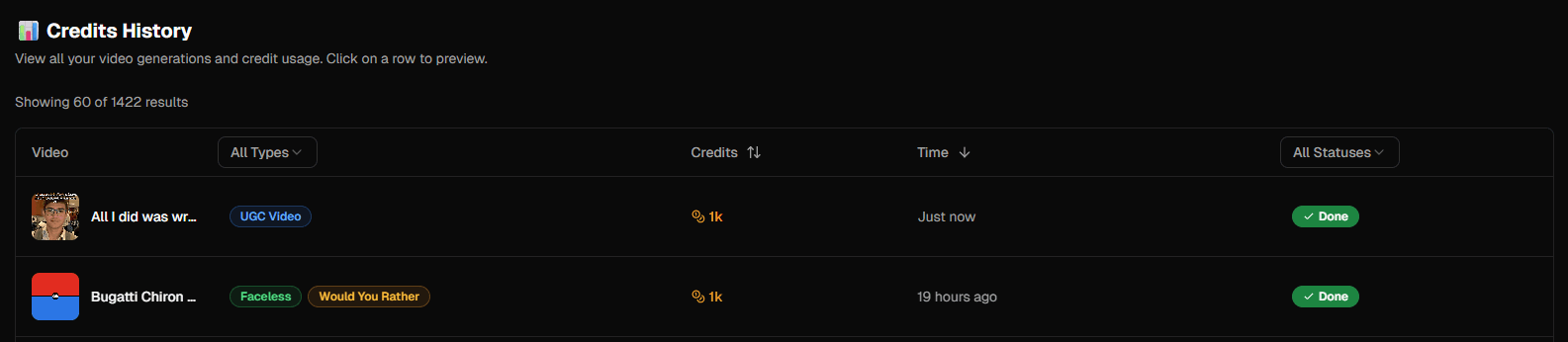
Pro Tip: Check your credit balance anytime in the dashboard or visit the Generation History page to see detailed usage.
Step 3: Tracking Your Usage
You can monitor your credit usage in real-time. Every video generation deducts credits immediately, and you'll see your remaining balance update instantly.
Subscription Tiers Explained
AutoFeed.ai has 3 plans, Hobby, Pro and Ultimate: Hobby from $19/month with 15,000 credits, posting 3x a week; Pro from $59/month with 60,000 credits, posting daily; Ultimate from $249/month with 180,000 credits, posting 2x a day. Visit AutoFeed.ai pricing for annual prices and the full feature comparison.
Choose Hobby If:
The Hobby plan is perfect if:
- You're just getting started with content creation
- You want to test the platform before committing
- You post content 2-3 times per week
- You're managing 1-2 channels
Upgrade to Pro If:
The Pro plan is right for you if:
- You're posting daily and need more credits
- You want to run more series at once
- You need daily auto-posting
- You want YouTube Clips and 24/7 Discord support
Pro Tip: If you keep running out of credits before the month ends, Pro is usually the cheaper fix than buying extra. See Pro pricing.
Go Ultimate If:
The Ultimate plan is ideal if:
- You're running multiple channels or brands
- You need maximum posting frequency (2x daily)
- You want priority support and the Video API
- You're serious about scaling your content business
Compare Ultimate with the other plans.
Maximizing Your Credits
Here are tips to make the most of your credit allocation:
- Plan your content: Use auto-posting series to generate content efficiently
- Monitor usage: Check your generation history regularly to understand your consumption patterns
- Optimize settings: Some video settings use more credits than others - experiment to find the sweet spot
- Upgrade when ready: If you're consistently running low on credits, it's time to upgrade
Ready to scale your content? View all pricing plans and choose the tier that fits your needs.
Automation & Scheduling
Automation & Scheduling
Plans from $19/mo · cancel anytime