How to Turn Long YouTube Videos into Viral Clips with AI
Repurpose podcasts, interviews, and long-form videos into viral shorts in minutes
Why Repurposing Long-Form Content Works
Every podcast, interview, and lecture is a goldmine of viral moments - but cutting them out by hand takes hours and most creators never bother. That's why repurposing is the single highest-leverage habit in short-form content: one 60-minute video can become 8-12 vertical clips that feed your TikTok, YouTube Shorts, and Reels accounts for an entire week. The audience that doesn't have time for the long version still wants the best 30 seconds, and short-form algorithms love when you give them exactly that.
How AutoFeed.ai's YouTube Clips Feature Works
AutoFeed's YouTube Clips runs a fully automated pipeline whenever you submit a URL:
- Download the source video using yt-dlp
- Transcribe the audio with word-level timestamps using Whisper
- Analyze the full transcript with AI (Gemini 2.5 Flash) to identify the most viral moments
- Cut each moment with FFmpeg using lossless stream copy
- Re-render each clip with burned-in captions, an optional 5-second hook overlay, and your chosen format (9:16, 16:9, or 1:1)
- Score every clip on Hook, Flow, Value, and Trend so you know which ones to actually post
The whole pipeline runs in the background - most jobs finish in 3-8 minutes depending on source length.
Setting Up Your First Clip Generation
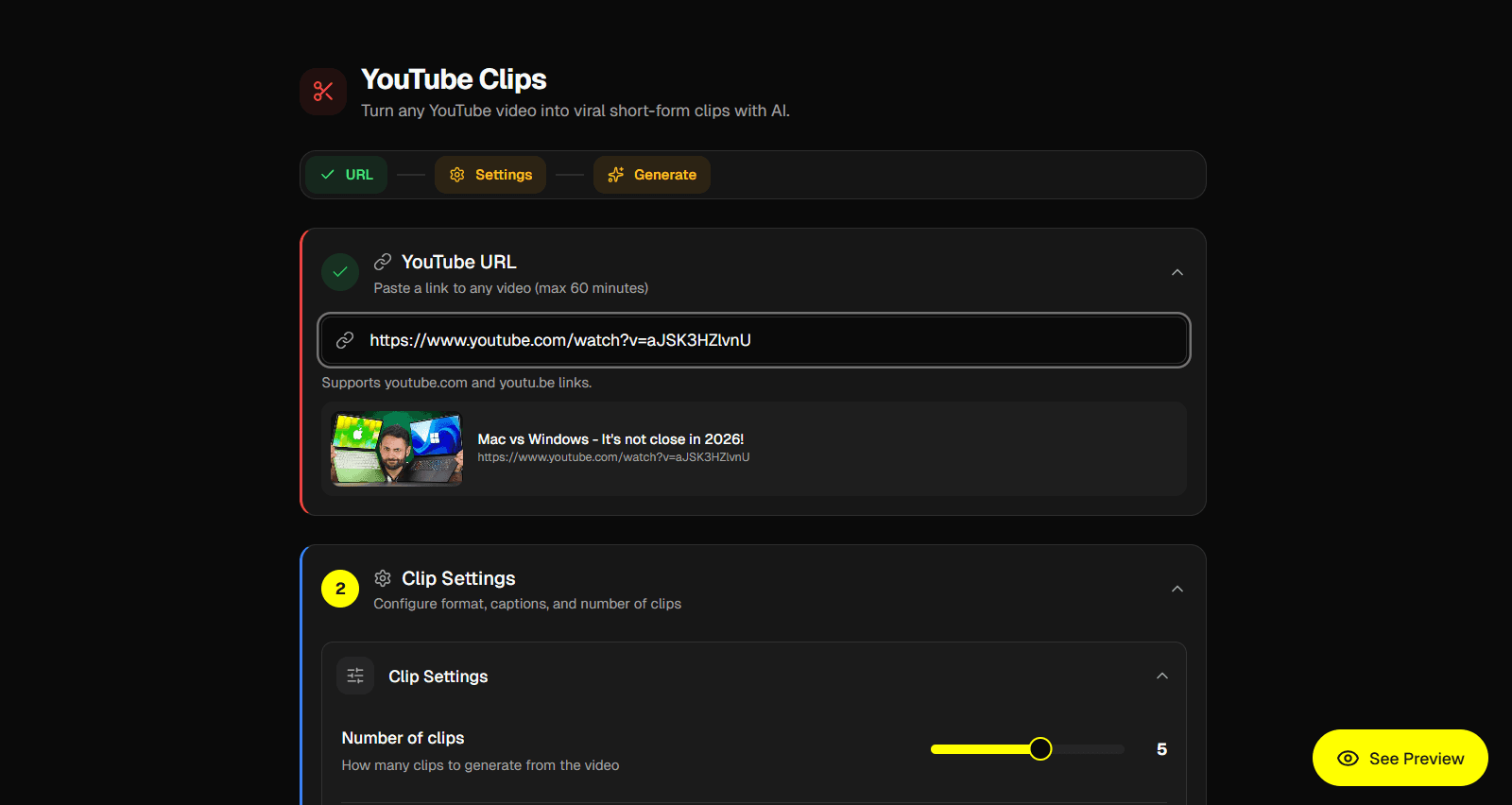
Head to Create → YouTube Clips in your dashboard. Paste a YouTube URL - anything from a 15-minute podcast highlight to a full 60-minute interview will work. AutoFeed will fetch the video's title and thumbnail so you can confirm you've got the right one before paying credits.
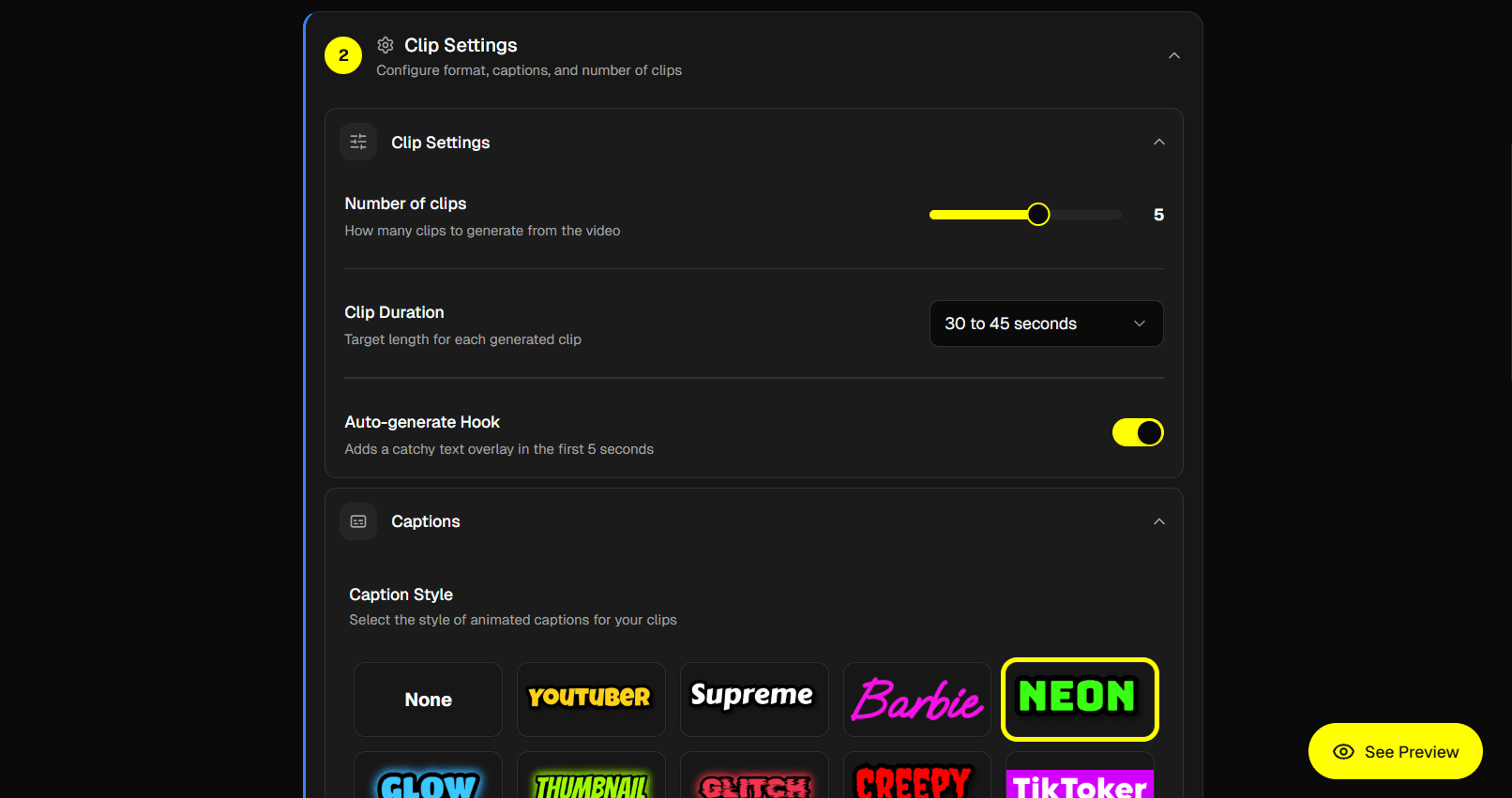
Once the URL is valid, the Clip Settings section unlocks. It contains three collapsible subsections:
- Clip Settings - number of clips (1-8 slider), clip duration (under 30s, 30-45s, 45-60s, 60-90s), and the auto-generate hook toggle
- Captions - caption style picker, caption size (Small/Medium/Large), and position (Top/Center/Bottom)
- Video Output - format (9:16 vertical for TikTok/Reels/Shorts, 16:9 horizontal for regular YouTube, 1:1 square) and video fit (Cover crops to fill, Contain letterboxes)
When you're ready, scroll to the Generate section and click Generate. AutoFeed immediately navigates you to the job detail page where you can watch the clips appear in real time as they finish - most jobs take 3-8 minutes.
Understanding the Virality Score System
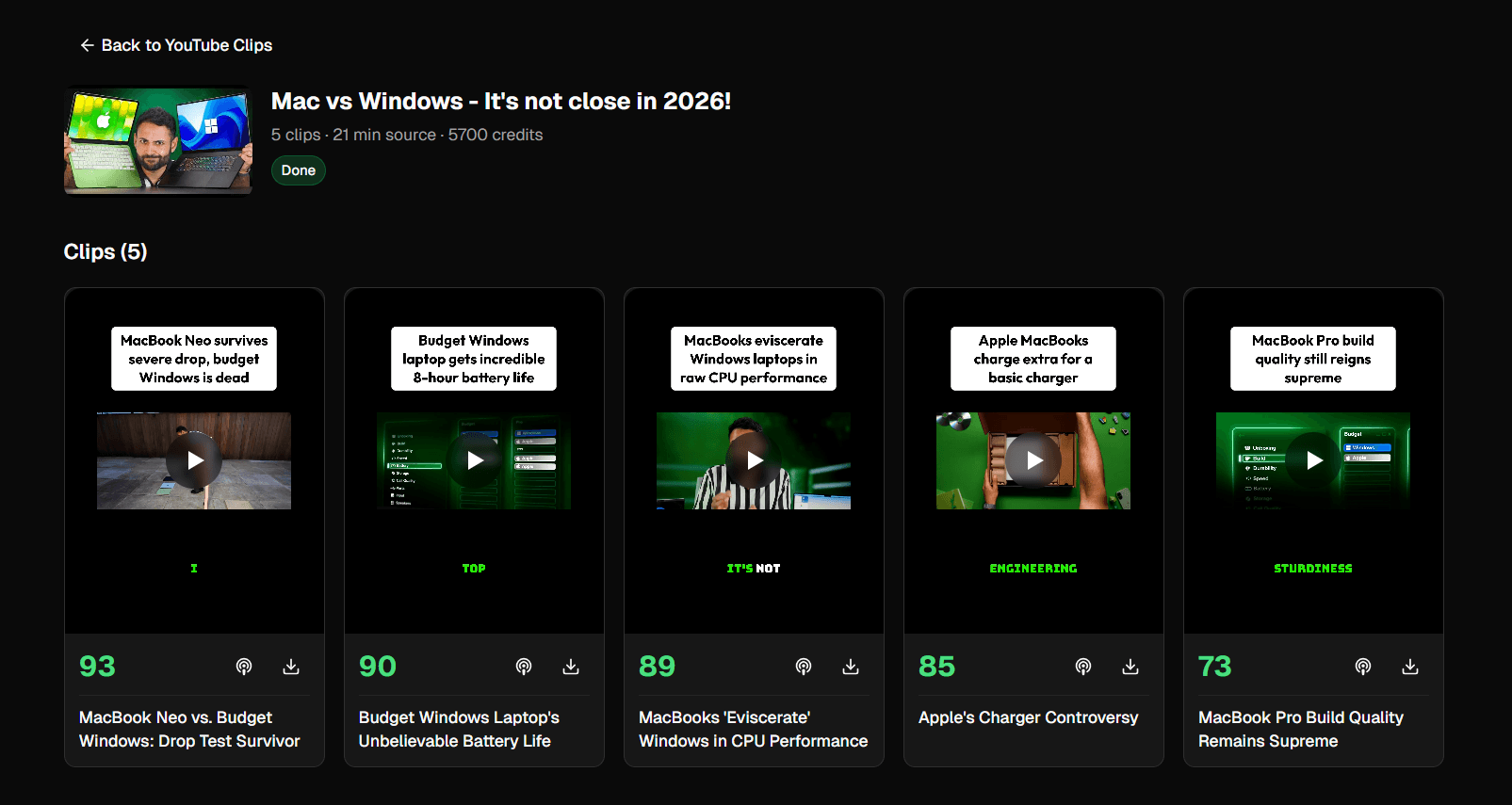
Each clip comes back with four scores out of 100 plus a letter grade from A+ down to D:
- Hook (0-100): How attention-grabbing the first 3 seconds are
- Flow (0-100): How well the clip stands alone as a self-contained thought
- Value (0-100): How insightful, useful, or entertaining the content is
- Trend (0-100): How well the clip aligns with current short-form patterns
Click any clip to open the detail dialog and see the full transcript, individual scores, and AI feedback explaining each rating. Don't feel obligated to post every clip - posting only your A and A+ clips trains the algorithm that your account produces high-engagement content, which lifts everything you post going forward.
Choosing Source Videos That Convert
Not every long-form video makes good clip fodder. The ideal source has:
- Multiple distinct ideas or stories - podcasts and interviews are perfect, music videos are not
- Strong audio narrative - talking-head content with clear takes
- 15-60 minutes of runtime - shorter videos may not have enough viral moments, longer videos get expensive fast (per-minute pricing)
- A confident speaker - clean, clear delivery without long pauses or rambling
Avoid: gameplay footage with no commentary, music videos, ASMR, slow tutorials with lots of dead air. AutoFeed will still produce clips from these, but the virality scores will reflect the underlying material.
Adding Hooks and Captions for Maximum Engagement
Two settings have an outsized impact on watch-through rate:
Always leave the hook overlay on. The 3-second white pill at the top of each clip gives viewers an instant reason to keep watching. AutoFeed auto-generates the hook text from the AI analysis - it's tuned to feel natural, not clickbaity.
Pick a punchy caption style. Center captions perform extremely well on TikTok because the algorithm tends to keep them in the safe zone away from UI overlays. Use Medium or Large size for accessibility - the audience scrolling at 2x speed needs to read it without effort.
Scheduling Clips Across YouTube Shorts and TikTok
Once your clips are rendered, you have three options for each one:
- Download the rendered MP4 and post manually
- Upload to Socials to push to YouTube or TikTok right now
- Schedule to pick a future date and time - AutoFeed will post it for you and you can manage it from the Calendar page
The scheduling option is where the real time savings compound. Generate 6 clips in one session, schedule them across the next 5-7 days, and you've automated a week of content in 10 minutes of work.
Pricing and Credit Costs
YouTube Clips uses a transparent three-part pricing formula:
- Base cost: 1,000 credits per job
- Per minute of source video: 100 credits
- Per clip generated: 500 credits
Example: A 30-minute video with 5 clips = 1,000 + 3,000 + 2,500 = 6,500 credits.
When you submit a job, AutoFeed charges based on a 30-minute estimate. Once the real video is downloaded, the cost is automatically adjusted - you get a refund if the video is shorter, or get charged the difference if it's longer. If a job fails for any reason, all credits charged are automatically refunded.
YouTube Clips is available on Pro and Ultimate plans.
Final Thoughts
Manual repurposing is dead. Spending two hours scrubbing through a podcast to find good clips, cutting them in DaVinci, and uploading them one at a time was barely worth it five years ago - today, with AI doing the curation and AutoFeed handling the rendering and scheduling, you can produce a week's worth of viral shorts before your morning coffee gets cold. Try YouTube Clips on AutoFeed.ai and turn your next long-form video into 8 vertical clips in minutes.
Latest from Blog

How to Create 'Pick One' Videos That Drive Massive Engagement
The forced-choice format that dominates For You pages on TikTok and Reels

Stop Wasting Your Long-Form Content: A Repurposing Playbook for Creators
Why every creator should build a repurposing pipeline - and how to do it with AI

How to Set Up Automated UGC Ad Campaigns for Social Media
Automate your UGC ad creation and posting with AutoFeed.ai campaigns