Automation & Scheduling
Auto Posting That Makes Its Own Videos
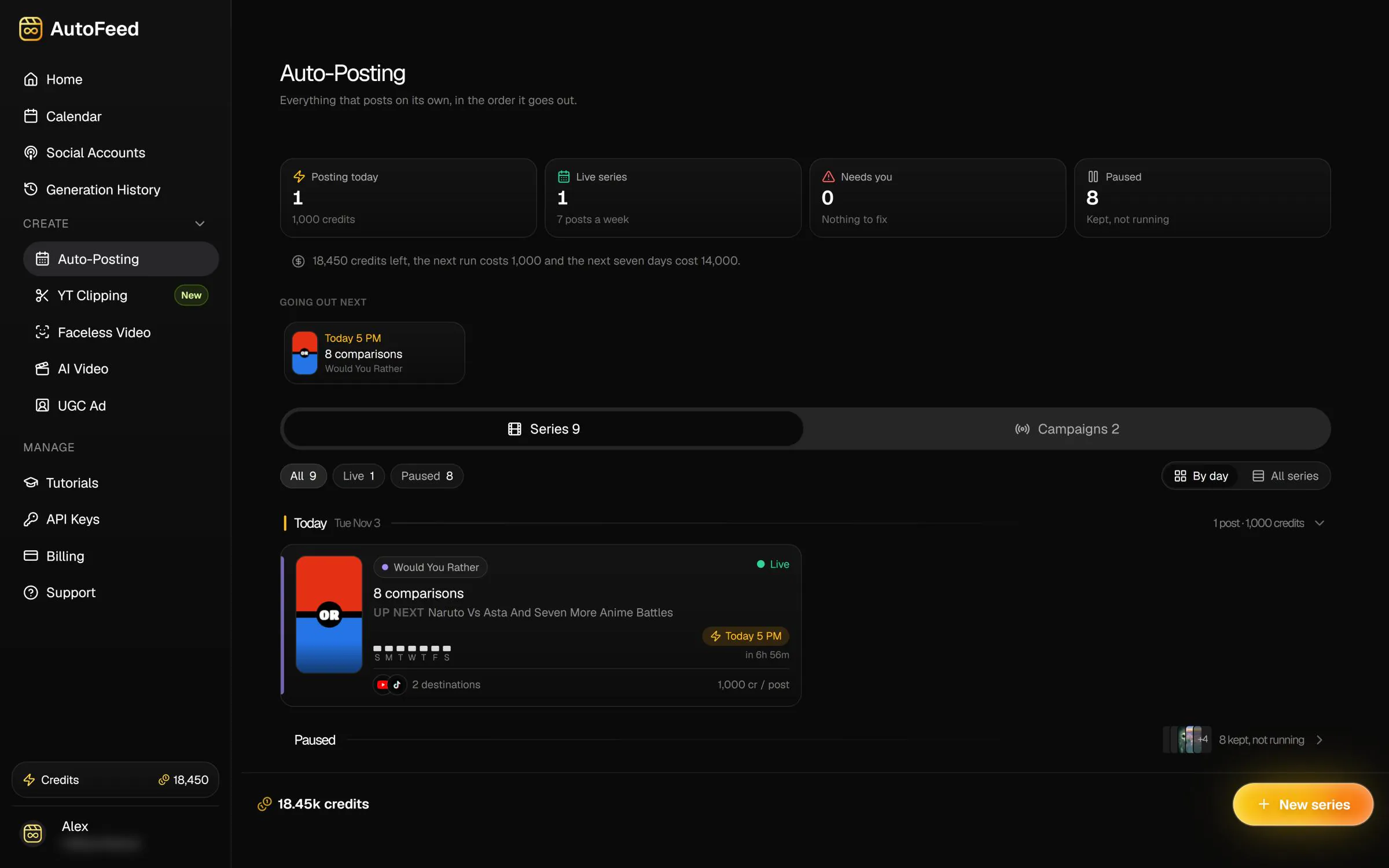
Set up a series once. At every time slot you pick, AutoFeed writes a new video, renders it, adds the voice and captions, and posts it to TikTok and YouTube Shorts. You stop opening an editor every day.
Plans from $19/mo · cancel anytime
- posts a week per series on Ultimate
- 14
- series running at once on Ultimate
- 5
- kinds of video a schedule can run
- 7
- AI models an AI Video series can use
- 24
Faceless formats, AI Video series and UGC ad campaigns all post on the same scheduler.
One Setup, a New Video Every Slot
A series is a recipe, not a playlist. You choose the format and write the brief once; AutoFeed generates a fresh video from it before each posting time, so nothing repeats and nothing has to be queued in advance.
Pick any of the 5 faceless formats (AI Slideshow, Reddit Stories, Would You Rather, Pick One, Fake Text), an AI Video series on any of 24 text-to-video models, or a UGC ad campaign for your product.

Your Days, Your Hours, Your Timezone
Add a posting time for each weekday you want to publish, pick the hour, and set the timezone your audience lives in. The schedule runs in that timezone, not the server’s.
How often a series can post depends on the plan: Hobby posts on up to 3 days a week, Pro on every day and Ultimate on every day with 2 slots a day.

Titles, Captions and a First Comment
Every post goes out with a title and a description written for that video, ending in hashtags. Keep that, add your own line underneath, or post the same fixed text every time.
- A separate caption for TikTok when it should differ from YouTube
- A comment posted under every YouTube video, for your call to action (TikTok gives apps no way to comment)
- Post one series to several TikTok and YouTube Shorts accounts at once

See the Month Before It Happens
The calendar shows every planned post across all your series, and the Social Accounts page shows what each channel actually posted in the last 30 days and how many views each video had after 24 hours.
Preview the next video before it goes out, regenerate it if you do not like it, or switch a series off and back on without losing its settings.
Posted by a series
What a Series Publishes
Four of the formats a schedule can run. Each video here was generated end to end by AutoFeed, script included.
Mom finds the million-view channel Everyday superpowers Three habits for better focus r/tifu, narrated over gameplay
How Auto Posting Works
Three steps, once. After that the series keeps going on its own.
- 01
Connect your channels
Connect each TikTok and YouTube Shorts account once, through the platform's own sign-in. - 02
Create a series
Pick a format, write the brief or choose a preset, then set the posting days, hours and timezone. - 03
AutoFeed makes and posts
Before each slot a new video is written, rendered, voiced, captioned and uploaded. Credits are spent per video; a failed render is refunded automatically.
Plans
How Much Each Plan Posts
The limits a series runs under on each plan, as the editor enforces them.
| Feature | Hobby | Pro | Ultimate |
|---|---|---|---|
| Price | $19/mo | $59/mo | $249/mo |
| Credits each month | 15,000 | 60,000 | 180,000 |
| Posting | 3x a week | Daily | 2x a day |
| Posting days per series | 3 a week | Every day | Every day |
| Slots per day | 1 | 1 | 2 |
| Active seriesFaceless and AI Video | 2 | 3 | 5 |
| Active UGC campaigns | 2 | 3 | 5 |
Every post spends credits from the plan's monthly balance: a faceless video starts at 1,000 credits. Prices are the lowest monthly price of each plan.
The package
Everything a Series Can Run
Auto posting is the engine. Each of these is a product of its own, and every one of them can feed the same schedule.
- This pageAutomation & SchedulingSeries that write, render and post for youUp to 14 posts a week per series
- Faceless VideosCreate viral faceless videos and auto-post them5 formats, from 1,000 credits
- AI VideosText and image to video with leading AI models28 models, from 400 credits
- YouTube ClipsTurn long YouTube videos into viral short clipsOn Pro and Ultimate, 1 to 8 clips a video
- AI UGC AdsAI actors presenting your product in UGC adsFrom 1,000 credits per ad
- Build With AutoFeedEvery video type from your code or AI assistantIncluded with Ultimate
Auto Posting Questions
Which platforms does AutoFeed post to?
TikTok and YouTube Shorts. You connect each account once with the platform's own sign-in, and a series can post to several of them at the same time.
Do I have to approve every video?
No. A series posts on its own once it is switched on. You can preview the next video, regenerate it, or switch the series off at any time.
How often can a series post?
Hobby: 2 active series, 2 UGC campaigns, up to 3 posts a week per series. Pro: 3 active series, 3 UGC campaigns, up to 7 posts a week per series. Ultimate: 5 active series, 5 UGC campaigns, up to 14 posts a week per series.
Can I pick the exact time a video goes out?
You pick the weekday and the hour for each slot, and the timezone the whole schedule runs in. Slots are on the hour.
Does every post use the same video?
No. A new video is generated for every slot from the series brief. An AI Video series rotates through up to 30 prompts in order, and can add a new scene detail so the same prompt does not post the same clip twice.
What does a post cost?
Each video spends credits from your plan: faceless videos from 1,000 credits, AI video clips from 400 credits depending on the model, UGC ads from 1,000 credits. If a video fails to render, its credits are refunded automatically.
Can AutoFeed post videos I made somewhere else?
AutoFeed is built to make the videos it posts. You can upload any video AutoFeed made to your accounts by hand or schedule it, but it is not a scheduler for footage produced in other tools.
Set It Up Once. It Keeps Posting
Your first series takes a few minutes. Plans from $19/mo.